
Google Reminders: Data management for employees and students
For this month’s Google Update, we wanted to help you out with some important reminders about how you should be using Google tools.

Google Reminders: Data management for employees and students
For this month’s Google Update, we wanted to help you out with some important reminders about how you should be using Google tools.
Miami uses Google products like Docs, Sheets, Drive, Photos, Calendar, and more for both business and educational reasons. As Google has made changes over the years to its service offerings, we always give Miami folks a heads-up with our long-standing series, Google Updates.
For this month’s Google Update, we wanted to help you out with some important reminders about how you should be using Google tools. Let’s take a look!
Pay attention to the “Pending delete” label
When Miami employees and students part ways with the university, their documents in Google Drive will show a label that says “Pending delete.”
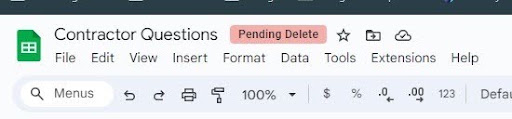
Long story short, “Pending Delete” will appear on documents that have been shared with you that are owned by a user who is no longer with Miami whose account will soon be deleted. This includes alumni who have graduated recently; graduate students who have left the university; and staff and faculty who have left the university.
IT Services recommends scheduling some time on a regular basis to see which documents are tagged with this “Pending delete” label, as all Miami accounts are on their own timeline! That spreadsheet the department admin shared with you last year, before they moved on to a different position at another university? That sheet probably has a label. A document shared by a student employee who graduated last summer? Probably a label there too.
The key is to check on a regular basis!
Read more about “Pending delete” in the Knowledge Base, and check out our handy YouTube video for how to find these documents.
Check the owners on calendars you have access to
As announced in September, secondary calendars that have no clear owner will be deleted on Oct, 5.
All secondary calendars created and shared by former Miami folks must have an active user with the role “make changes and manage sharing” to avoid deletion.
IT Services is making a best effort to identify these calendars and take action where we can. However, you can help us ensure that Google does not delete anything you need by checking calendars that you have the ability to make changes on (both under “My calendars” and “Other calendars”) to see if you have a calendar where the owner field is blank.
Please see the IT News announcement for more detailed information about this calendar change.
After Oct. 5, Google will no longer give advanced notice about these deletions — they will simply delete the calendars when the account goes away. Therefore, our recommendation is to add calendar management to your regular Google hygiene activities!
Students and employees: Keep personal data separate!
IT Services recommends using Miami Google resources for Miami-related activities only (e.g., work or school purposes). However, we know that isn’t always possible, and sometimes we save things in the easiest place to reach.
Therefore, it’s important to regularly go through your Miami Google Drive and Photos and make sure that you are saving anything you want to keep to a personal Google Drive or other data storage medium.
This is especially important for students. After graduation, students retain access to their Google Drive for one year, after which their access will be removed and their data deleted from Miami’s domain. Students who wish to keep that data should move it to a personal Google account (via Google Takeout) or download and store locally on their own device.